← All work Case study · Self-initiated
Factory ERP: Attendance & Leave

An HR module for an 800-worker garment factory, where the leave screen answers the real morning question first: will every line run today?

RoleUX decisions and build, solo
BuiltJourney, IA, tokens, 4-screen prototype
StatusClickable prototype
SurfaceDesktop, 1920px
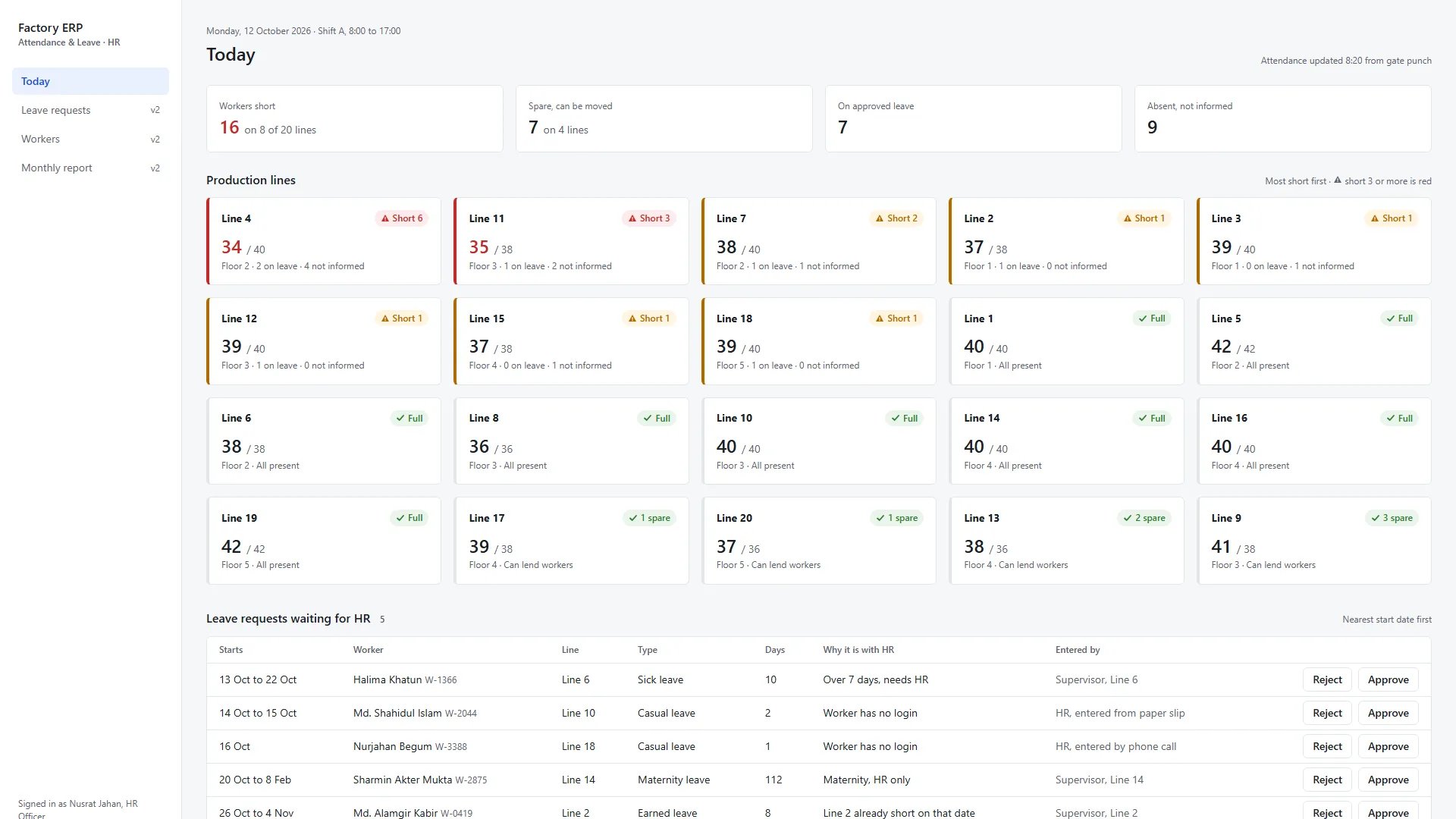
Today dashboard: workers short 16 on 8 of 20 lines, spare 7, and a grid of 20 production lines with Line 4 short 6 first

Today: lines that are short come first. Leave requests sit below.
01

The brief

Before this project I had never designed an ERP. Most of my work was consumer products: an exam platform, a car marketplace, a metro app. Software companies here build ERPs for garment factories, hospitals and schools, so I set myself one: the attendance and leave module of a factory ERP.

I chose a garment factory on purpose. Worker, line supervisor, floor manager, HR: more layers make the approval flow harder, and if it works here, a 200-person office is easier. The main user is the HR officer, who has this screen open most of the working day.

02

The real problem

A leave module usually opens on a list of requests. But when HR walks in at 8 AM, the first question is not "what is pending?". It is "will every line run today?" A line short of workers loses the whole day's production; a leave request can wait an hour.

So the leave data is shown in HR's own words, in the order HR needs it:

Short 6Which line, how many

20 lines on one screen, most short first. Short 3 or more turns red, always with a word and an icon, never colour alone.

WhyLeave or not informed

The system already knows who has approved leave, so HR does not have to phone the supervisor to ask.

WhoCan cover the gap

Spare workers from other lines, matched by the operation they can do, not just counted.

03

What I built

I made the decisions first: the factory, the user, the morning journey, what goes biggest on the screen. Then I directed AI to build a 4-screen prototype from my IA and tokens, and clicked through every flow myself.

The journey, red line to green

Today shows Line 4 short 6. Line detail splits the six into 2 on approved leave and 4 who did not inform. HR marks the four absent, opens Replacements, moves six spare workers in, and Line 4 turns Full.

Move by skill, not by headcount

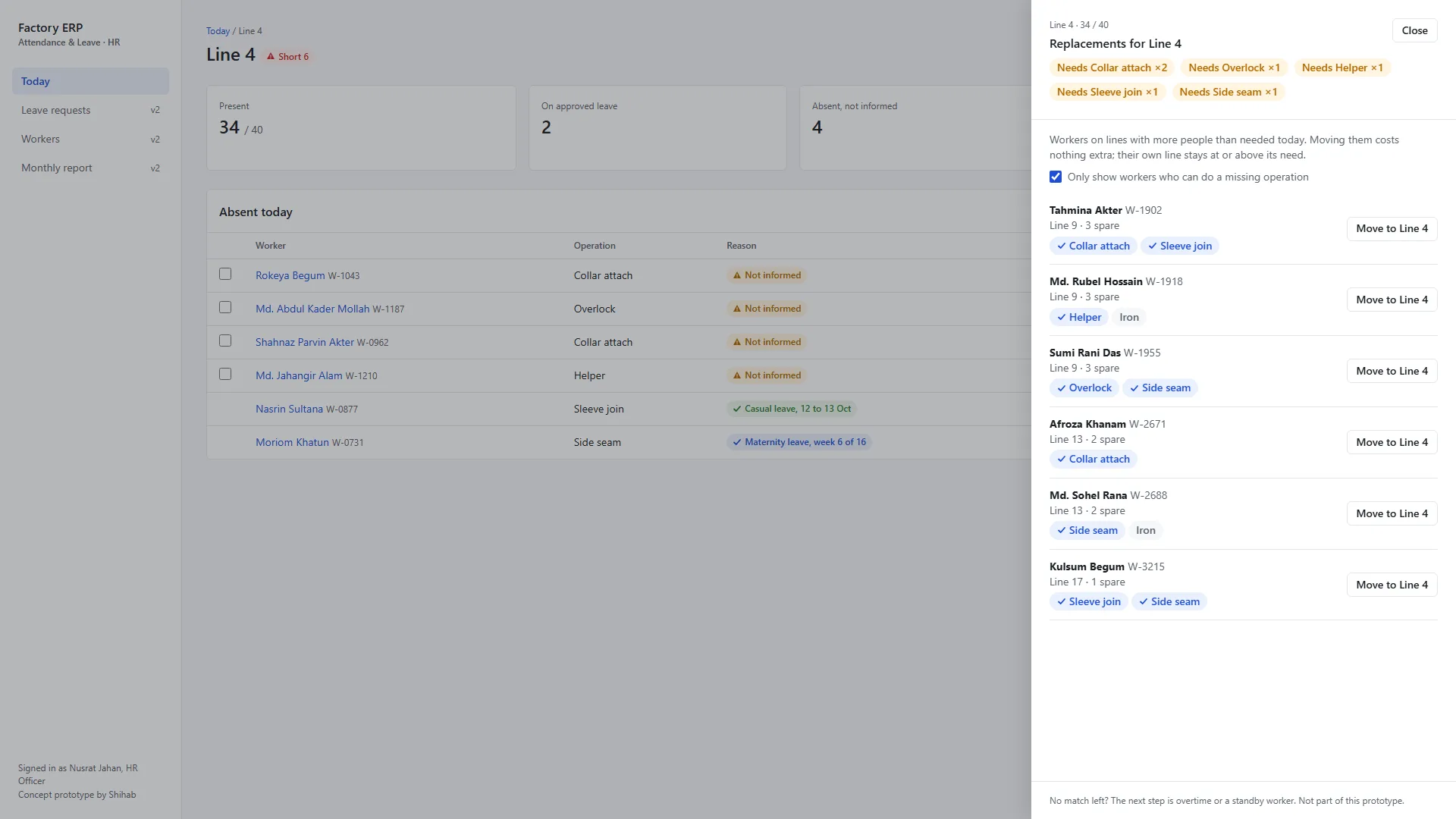
In a garment line a helper cannot replace a collar operator. The drawer shows what Line 4 is missing (Collar attach ×2, Overlock ×1 and so on) and only offers spare workers who can do one of those operations.

Workers do not have to touch the system

Many floor workers have no computer, and today they tell their supervisor out loud. Every request records who entered it (supervisor, or HR from a paper slip), so self-service can be added later without a redesign.

The factory's rules, as states

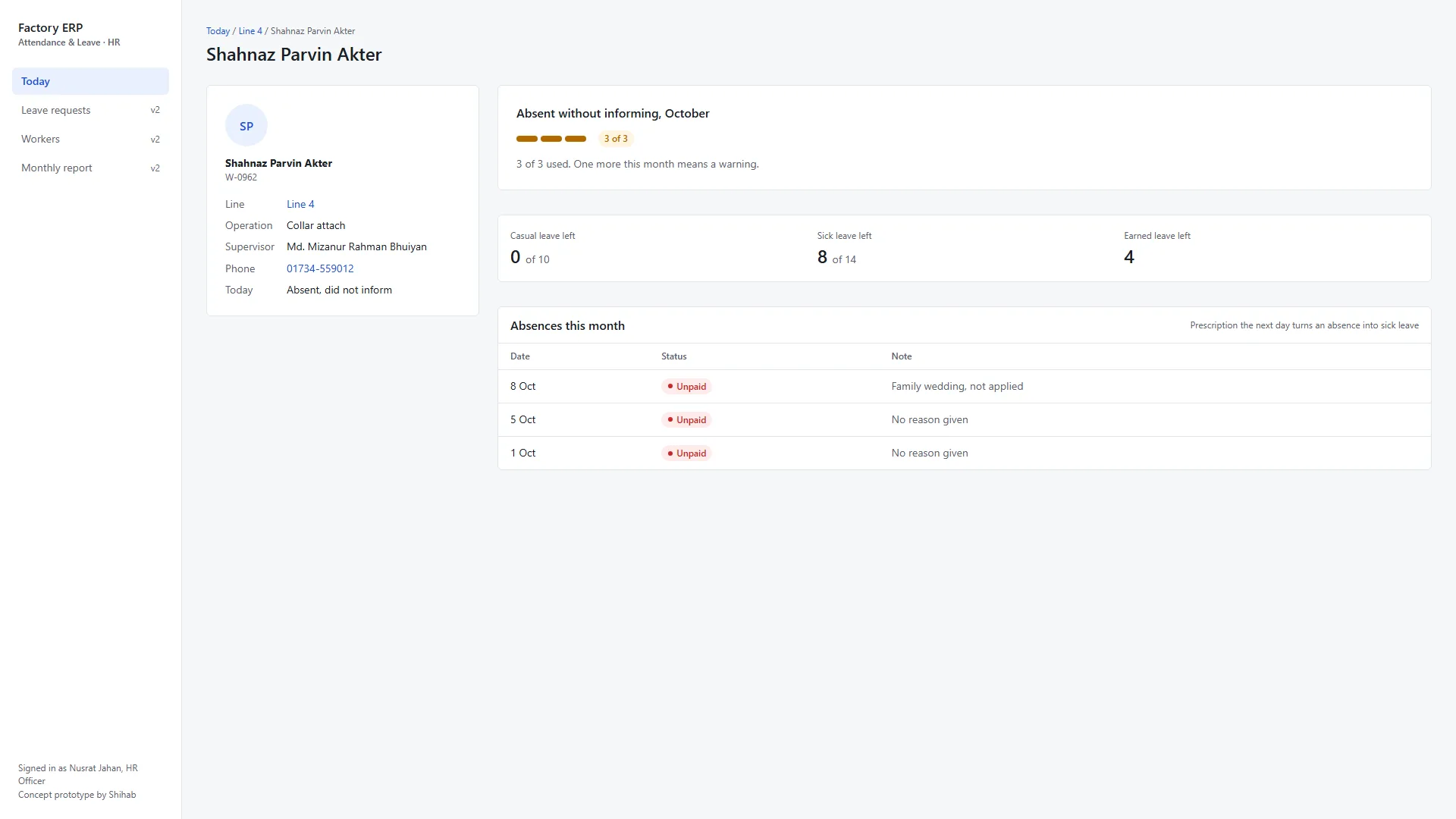
Absent without informing is unpaid. A prescription the next day turns it into sick leave. More than three in a month means a warning. The worker profile shows a 3-strike counter and lets HR convert an absence with the prescription attached.

Replacements drawer for Line 4: missing operations at the top and spare workers from Lines 9, 13 and 17 with matching skills highlighted
Replacements: what is missing, and who can do it.
Worker profile: 3 of 3 absences without informing this month, leave balance, and the absence history
Worker profile: the 3-strike rule in words, not in HR's memory.
04

What I rejected

Leave requests on top. It is a leave module, so the queue was the obvious hero. I put the lines first because a stopped line costs a day of production, and moved the queue below.

A worker self-service app, for version one. It is what modern HR software does, but it assumes a phone and a habit these workers do not have yet. The data model keeps the door open.

Seven screens. The IA listed seven. I built four: one complete story from a red line to a green one is stronger than seven half-built screens.

05

Reviewing my own work

Before running any audit I used the prototype as HR and wrote down three problems myself: the drawer's decision info was 12px, "Mark absent" could not be undone even though it cuts a salary, and "Issue warning" fired with no confirmation.

Then a heuristic evaluation against Nielsen's ten: 1 pass, 6 need work, 3 fail. Two of the three fails were already on my list. I fixed all three fails and the text size first: Undo on every mark and move, a Send back action, and a confirmation for warnings and for any leave over 7 days.

06

Outcome

A clickable prototype of one complete HR morning. Factory, workers and numbers are samples, and nothing here has been tested with a real HR officer yet. On a real project, a morning on the factory floor would come before any of this.

20lines on one screen, no scrolling
3 of 3audit fails fixed
4screens, one complete story
What I got wrong

The first dashboard said "Present 771 / 780". It read as nine people missing, a normal morning. The real gap on the short lines was 16: seven spare workers on other lines were cancelling it out, and spare workers on Line 9 do not fix Line 4 until someone moves them. The number was true and still misleading. I had not caught it; the audit did. Now short and spare are two separate numbers, and I question the numbers on a screen, not only the clicks.

Next case study dayexam.com →